


















Best viewed using:
Internet Explorer
or
Mozilla Firefox


Connecting the NLD8091 & NLD8091B Photon Torpedo Simulator
I
The NLD8091
is programmed to realistically simulate the visual effects of Star Trek® Photon
Torpedo initialization and firing sequence. Two LEDs are connected to outputs
(solder points
3 -
7)
and power is applied to inputs (points
1& 2).
Manual firing and auto-repeat firing are both available.
This module is
not
designed for use with (filament) type bulbs.
Utilizing
the industry’s smallest
microcontroller and associated voltage control circuitry, the total module
consumes less than 1/2 ma. Typical peak operating current with both LEDs
attached is about 39 ma. This makes the NLD8091
well suited for low power applications such as battery operation but can easily
be powered by any well-filtered and regulated DC power source with an output of
4-16VDC.
The very small overall size of this module will allow it to be easily placed in
and around most modeling applications
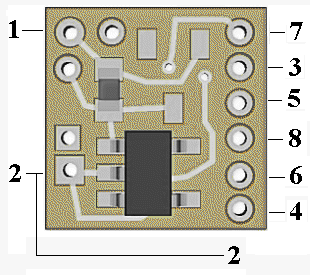
Figure 1
Important note: A low-wattage iron with a pointed tip should be used for connection of wires. Too much heat or solder can easily damage the wires or module and void the warranty.
Also, all connecting wires should be pre-tinned before soldering them to the module. This will make connection quick and easy and ensure excessive heat is not applied to the solder points.
Solder point #2 is the -DC (or ground) power connection.
Connecting the NLD8091:
Installing
the NLD8091
is very straightforward. Because the module has circuitry on both sides, care
must be taken to be sure that the components or wires soldered will not make
contact with any metal object and cause a short
circuit.
Included with the module are three 6” lengths of #32 insulated wire. If
necessary, these can be used for power input wires. If used, we recommend the
red wire be used for the + DC connection. It would be connected to solder point
1
as shown in Fig. 1. This wire could also connect through a switch to the + DC
connection for remote control of the lighting effect. The other (black) wire
should be connected to – DC and to solder point
2.
The violet wire can be used for control wiring.
When connecting the LEDs, proper polarity must be
observed. LEDs are “polarity sensitive” and will not function if connected
backwards.
The NLD8091
is configured for the connection of two 20 ma LEDs.
One with a device voltage of 1.75-2.0 VDC connected to solder points
3
&
4
(this covers all of Ngineering’s Micro and Nano red LEDs, as well as many red
LEDs available). A second LED with a device voltage of 3.2-3.6 VDC connected to
solder points
5
&
6
(this covers all of Ngineering’s 2x3mm, Micro and Nano white LEDs.
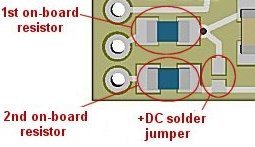
Figure 2
Using wire
appropriate for the size of the LED and its placement in the model, connect the
white LED
cathode
(the
–
connection) to point
5
on the module and its
anode
(the +) to solder point
6.
Connect the red LED
cathode
(–) to solder point
3,
and its
anode
(+) point
4
on the module. See Fig. 3 for a schematic layout of LED hookup.
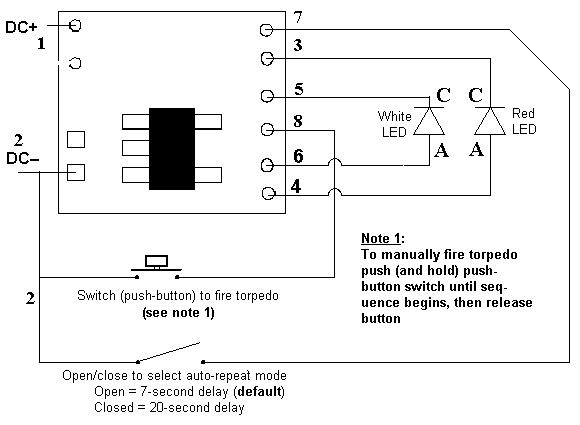
Figure 3
Simulator Configuration Options:
1.
Manual firing with auto-repeat enabled:
If auto-repeat firing of the photon torpedo is desired but manual firing is
needed on demand, it is recommended that a push-button switch be wired into this
circuit for easy control. Wire the push-button switch between point
2
and point
8
as shown in figure 2 (on back). To manually fire the torpedo, push and hold the
push-button switch until the firing sequence starts, then release the button. In
manual mode the torpedo can be fired every 2 seconds. Without manually firing,
the photon torpedo will auto-repeat firing at timing set by solder point
7
(see paragraph 3).
2.
Manual only firing (no auto-repeat):
If you
intend to only manually fire the torpedo, (no auto-repeat mode), simply
wire a push-button switch, into either power connection (+DC point
1,
or –DC point
2)
of the Simulator. Press & hold the button and the torpedo will fire after
1/4-second. Sure to hold the push-button closed for the full firing sequence,
otherwise the Simulator will lose power and the sequence will stop short.
3.
Automatic firing mode:
As
mentioned in the previous paragraph, the default mode for the N8091
(without manually firing) is auto-repeat firing once every 7 seconds.
An alternate auto-repeat mode is to have the torpedo fire once every 20
seconds. To set this timing sequence, connect a wire from solder point
7
to point
2
(DC–).
For
additional flexibility a switch could be wired between point 7
and point
2.
This would allow either auto-repeat timing sequence to be selected.
Once again,
be sure to use a low-wattage soldering iron when connecting wires to the module.
Our N40M2 12-watt Iron with either the N408I (iron clad) Needle Tip, or the
N408X (bare copper) Needle Tip would be an excellent choice for this operation.
This completes connection of the N8091. It is recommended that a thorough re-inspection of all connections and module placement be performed prior to applying power to your model. We hope you enjoy the added realism our module provides.
NLD8091B Option:
The "B" version of the N8091 has the added "throw" option/font> which simulates a "wind-up and throwing" effect for the launching of the photon torpedo.
© 2026 Ngineering